
Hot reload beta
INFO
Hot reload is complex to implement and requires many compatibility scenarios. If this project helps you save development time, you might as well click 

When writing code traditionally, you need to restart the application to take effect. Hot reload makes code changes take effect immediately without restarting the application, greatly improving iteration efficiency. It supports changes to class properties and methods (including proxy classes), Spring, Solon, MyBatis, and other mainstream frameworks. It is compatible with JDK 8, JDK 11, JDK 17, JDK 21, JDK 25, and other versions.
1. Enable hot reload
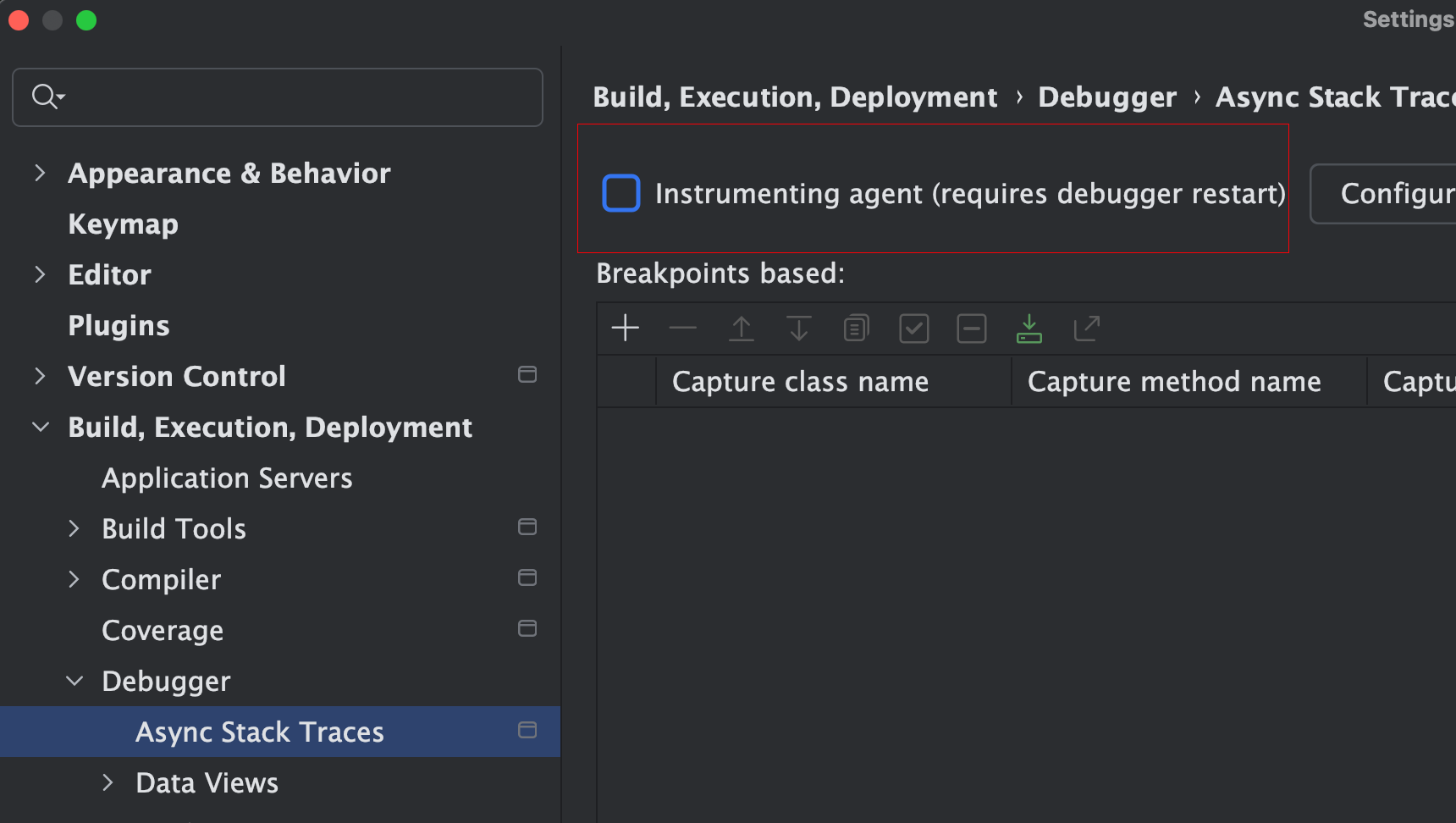
- Please disable the
Build, Execution, Deployment -> Debugger -> Async Stack Tracesconfiguration in IDEA.
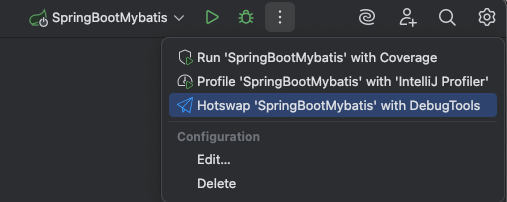
- Click
Hotswap 'xxx' with DebugToolsinMore Actionsto start the application with a hot reload.
If you find it cumbersome to open More Actions every time, you can place the button in the Main Toolbar
For example, add a button on the right side as shown below:
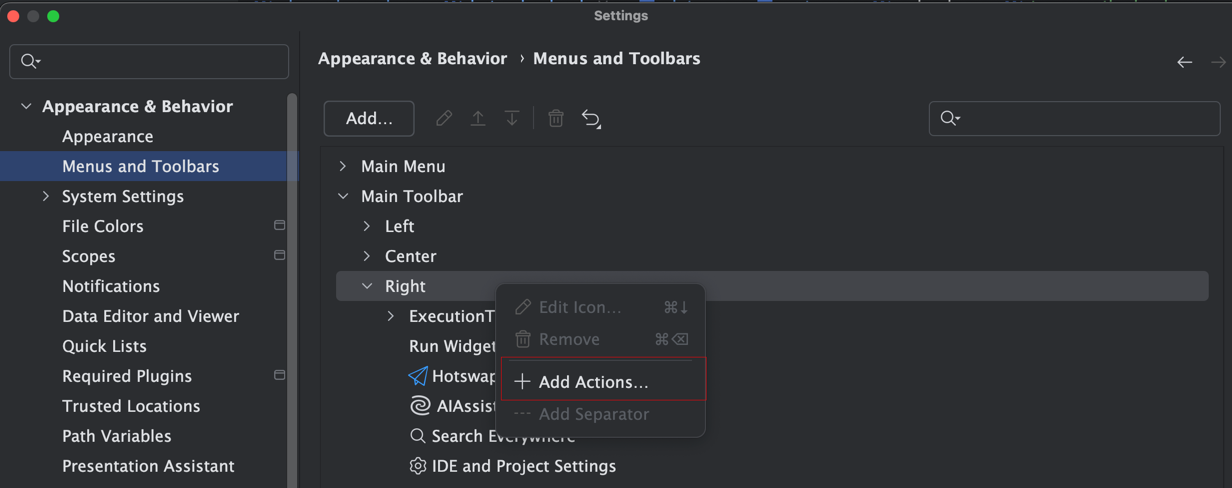
Search for Hotswap with DebugTools. If you want to change the icon, you can also modify it below.
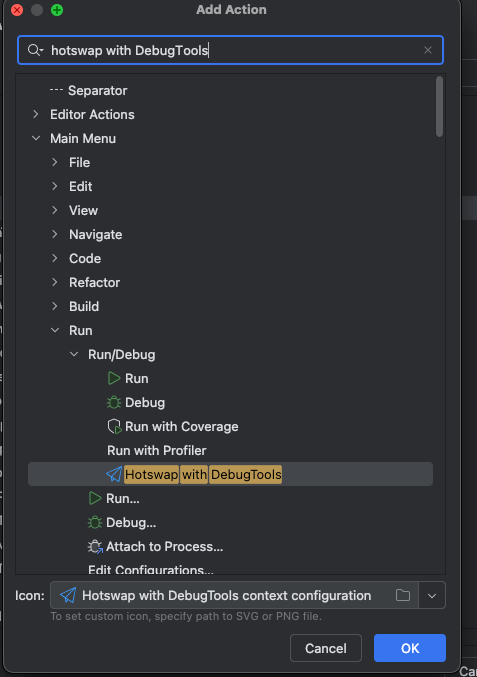
This will allow you to click from outside the application.

TIP
Hot reload requires a specific JDK to take effect. Please refer to JDK installation to complete JDK initialization
If the startup project prompts
DCEVM is not installed, check whether the JDK installation is correct. JDK8 Check whether the commandjava -XXaltjvm=dcevm -versioncan be output normally.

2. Trigger hot reload
Start the application in debug mode. The project outputs the following log and prints the loaded hot reload plug-in.
DebugTools: 2025-01-07 16:41:07.909 INFO [main] i.g.f.d.t.h.c.HotswapAgent 44 : open hot reload unlimited runtime class redefinition.{3.3.0}
DebugTools: 2025-01-07 16:41:08.498 INFO [main] i.g.f.d.t.h.c.c.PluginRegistry 132: Discovered plugins: [JdkPlugin, ClassInitPlugin, AnonymousClassPatch, WatchResources, HotSwapper, Proxy, Spring, Solon, Mybatis]
2.1 Debug hot update
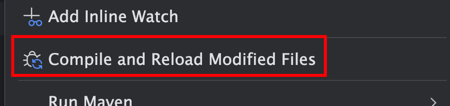
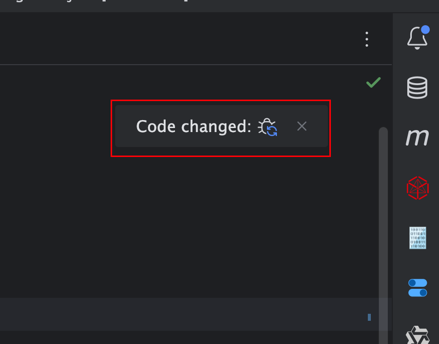
If the application is started by Debug, hot reload can be triggered by the following method, and breakpoint information can also be updated.
- Use the
Compile and Reload Modified Filesbutton in the right-click menu.
- Use the
Code changedbutton on the main file page.
2.2 Hot deployment
Hot deployment can send changes to remote applications, and it can also deploy local changes to an already attached target application.
For detailed configuration and operation steps, see Hot Deploy.
2.3 Single file remote compilation
Open the context menu in a Java source file editor or project tree, then click Remote Compile "xxx.java" to Hot Deploy. The plugin saves the current file, sends the source code to the attached target application, and the target application compiles and hot deploys it.
If the current project is connected to multiple applications, the plugin asks you to choose the target connection first. The request uses the ClassLoader currently selected on that connection card.
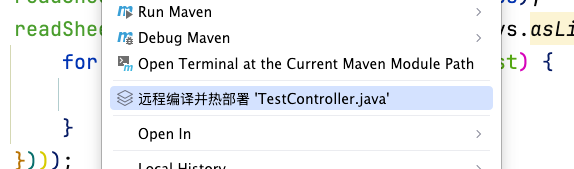
After hot deployment completes, the result is printed in IDEA's Run tool window. The tab title is Remote Deploy Result; when multiple applications are connected, the title also includes the application name.

TIP
- Hot reloading of changed files through hot deployment is only supported after the application is attached
- When using remote dynamic compilation, the attached application must be started through JDK, not JRE.
TIP
During hot deployment, idea may sometimes fail to obtain the latest breakpoint information. If you need to update the breakpoint in time, please use Method 1
2.4 Single Resource File
Starting with 5.3.0, single-file operations support non-Java files such as XML, HTML, FTL, YAML, and Properties. Open the context menu in the file editor or project tree and click Copy 'filename' to target to write the file into the module's production output directory by relative path.
For example, src/main/resources/templates/index.ftlh is copied to target/classes/templates/index.ftlh. The actual directory follows the IDEA module output configuration.
This updates the resource file without automatically refreshing every framework's configuration. See Resource File Hot Reload and Deployment for the steps and conditions.
2.5 Automatically Reload Changed Class Files
5.3.0 adds Settings | DebugTools | Hot Reload | Automatically reload changed class files, disabled by default.
- Enable the setting and save it.
- Restart the target application. Supported ordinary Java Run/Debug configurations also inject the hot reload Agent when this setting is enabled. This entry point does not apply to the Maven or Gradle launcher processes themselves.
- After editing Java source, compile it in IDEA or update the output directory through your existing compilation workflow.
- When the Agent detects changes in compiled
.classfiles, it automatically redefines classes already loaded by the target ClassLoader.
Automatic watching does not compile Java source. Saving a .java file without updating compilation output does not trigger reloading. New classes that have not been loaded are outside the scope of redefining loaded classes.
TIP
- Automatic reloading still depends on the target JDK's class redefinition capabilities. To add or remove fields and methods, complete JDK Installation first.
- Restart the application after changing this setting. It does not change an already running JVM dynamically.
- Automatic watching can overlap with
Compile and Reload Modified Filesor manual hot deployment. Choose the trigger method that fits your workflow. - Disabling the
HotSwapperplugin disables automatic reloading.
When starting outside IDEA, add autoHotswap=true to your existing hot deployment startup parameters:
-javaagent:/path/to/debug-tools-agent.jar=hotswap=true,autoHotswap=trueThis is only an Agent parameter example. Configure the DCEVM, enhanced class redefinition, and module access parameters required by your JDK as described in Hot Deploy.
3. In which cases can hot reload be performed
3.1 Ordinary class files
- Add new class files
- Add/modify properties/methods/inner classes in existing classes.
- Anonymous inner class
- Enumeration class
Click class file hot reload for details
Pay special attention to changes in static information
Hot reloading of static fields will cause the values initialized at compile time to overwrite the values at runtime. See click for details.
3.2 Proxy class
- Java JDK proxy class.
- Cglib proxy class.
Click proxy class hot reload for details
3.3 SpringBoot Bean
- Controller
- Service
- Component
- Repository
Click SpringBoot for details
3.4 MyBatis
Mapper (new/modified)
Xml (new/modified)
Note
MyBatis currently supports Spring environment, other situations are unknown.
Click MyBatis for details
3.5 MyBatisPlus
Entity (new/modified)
Mapper (new/modified)
Xml (new/modified)
TIP
MyBatisPlus currently supports Spring environment, other situations are unknown.
Click MyBatisPlus for details
3.6 dynamic-datasource
@DSannotation added@DSannotation modified
Click DynamicDatasource for details
3.7 HuTool
Support hutool hot reload
ReflectUtilreflection tool classBeanDescbean descriptorJSONUtiljson tool class
3.8 Gson
Support Gson toolkit hot reload
3.9 EasyExcel
Support EasyExcel hot reload
3.10 Jackson
Support Jackson hot reload
3.11 FastJson、FastJson2
Support FastJson、FastJson2 hot reload
3.12 hibernate-validator
Support hibernate-validator hot reload
3.13 Solon
Support Solon class and container hot reload
ControllerComponentConfiguration- ...
Click Solon for details
3.14 OpenFeign
Supports hot reload of OpenFeign
- Supports adding/modifying interfaces annotated with
@FeignClient
3.15 Forest
Supports hot reload of Forest
- Supports adding/modifying interfaces and other components
3.16 Freemarker
Supports template content updates and object wrapper cache clearing after class redefinition. See Freemarker Hot Reload.
3.17 Thymeleaf
Supports clearing the current template's cache before rendering. See Thymeleaf Hot Reload.
3.18 Others
Hot reload can also be used in other situations. I won’t give examples here. If it doesn’t work, please submit an issue to give feedback.
4. Disable Hot Reload Plugins
If a hot reload plugin has compatibility issues in the current project, temporarily disable the specified plugin in Settings | DebugTools | Hot Reload, then restart the application with hot reload.
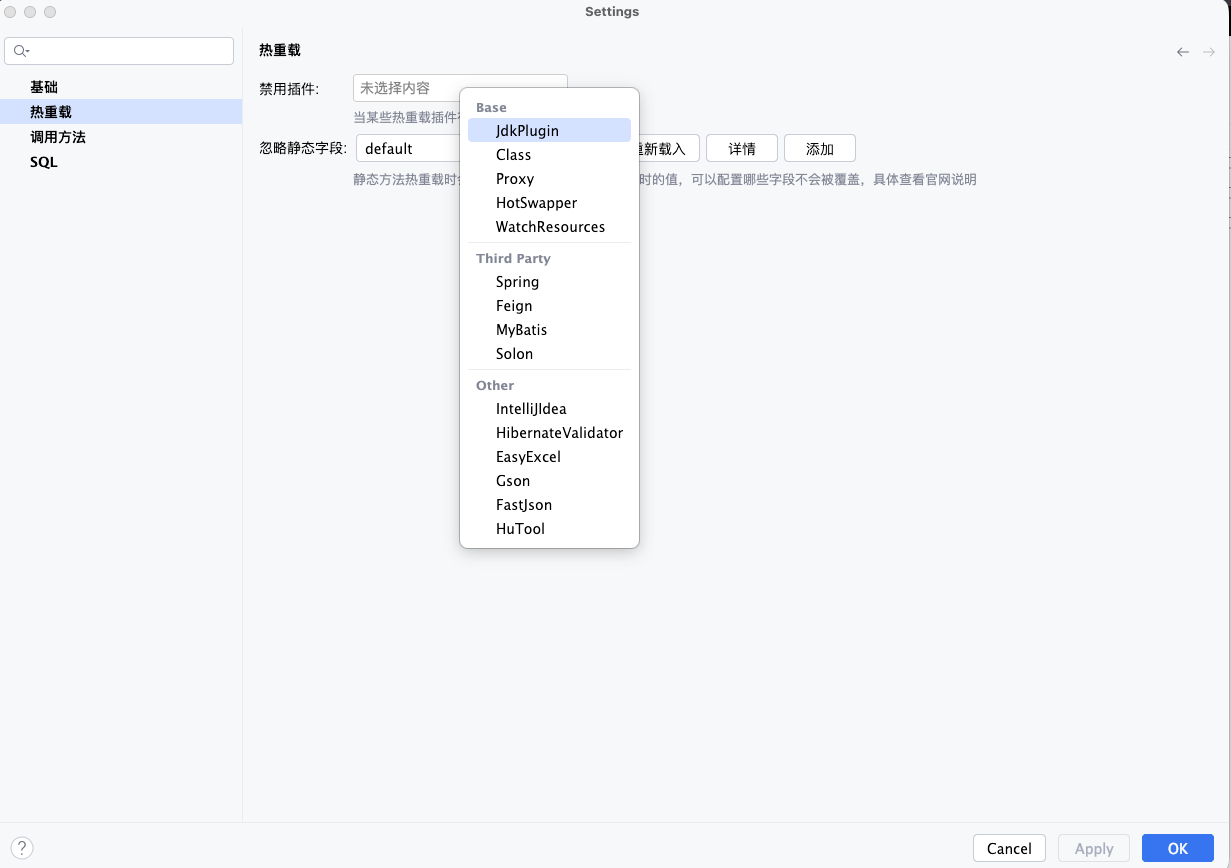
Disabled Plugins writes the selected plugin names into the hot reload startup parameter disabledPlugins. During Agent initialization, plugins with matching names are skipped. This is useful for temporarily avoiding startup exceptions, class transformation exceptions, or hot reload side effects caused by a specific framework plugin.
Available plugins are grouped by type:
| Group | Plugins |
|---|---|
| Base | JdkPlugin, Class, Proxy, HotSwapper, WatchResources |
| Third Party | Spring, Feign, MyBatis, Solon, Forest, Freemarker, Thymeleaf |
| Other | IntelliJIdea, HibernateValidator, EasyExcel, Gson, FastJson, HuTool |
WARNING
- This configuration only affects applications started with hot reload after the setting changes. Already running applications do not unload plugins immediately.
- Disabling a plugin also disables the corresponding capability. For example, after disabling
Spring, hot reload capabilities related to adding or modifying Spring Beans stop working. - If you are only troubleshooting, disable one plugin at a time, confirm the impact, then decide whether to keep it disabled.